Environment
Database
 Download the shows.sql database
Download the compressed shows.sql.zip database
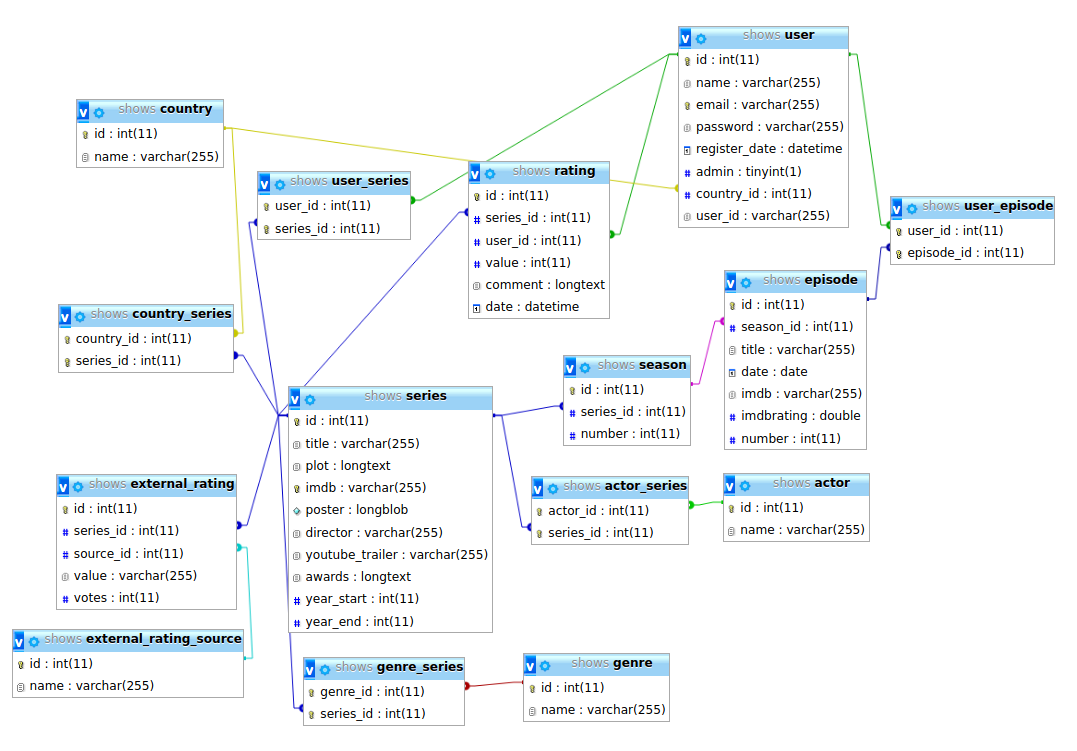 View the database schema
 My database at the department
The shows database used in this course is a MySQL/MariaDB database.
You can download it using the link above.
Docker
To get PHP and MySQL on your computer, you can use the following docker-compose.yml file:
# docker-compose.yml
version: '3.2'

services:
    db:
        image: mysql:8.0
        container_name: appsDB
        restart: always
        ports:
            - '6033:3306'
        environment:
            MYSQL_ROOT_PASSWORD: s3web

    app:
        depends_on:
            - db
        image: phpmyadmin/phpmyadmin
        container_name: phpmyadmin
        restart: always
        ports:
            - '9090:80'
        environment:
            PMA_HOST: db
            UPLOAD_LIMIT: 128M
Then, run:
docker-compose up -dAt the IUT computer science department, use podman-compose instead of docker:
/mnt/netta/apps/vnet/bin/podman-init-storage
source /mnt/netta/apps/vnet/bin/vnet.rc
podman-compose up -d
Then:
- You can access PHPMyAdmin at http://localhost:9090
- You can use
localhoston port6033to access your MySQL database, with the usernamerootand the passwords3web.