PHP Lab 1: The basics
Getting started
Try out the PHP built-in server. To do so, you can for example write the
file date.php:
<?php
echo "It is ".date('H:i:s');
Then run:
php -S 127.0.0.1:8080Then go to http://127.0.0.1:8080/date.php and look at the result.
Environment
Set up your favorite editor, or pick one for web development.
We recommend for example Visual Studio Code, Atom, NetBeans, PhpStorm etc.
Home page
Create a simple home page that gives access to all the exercises you will do during this course (sorted by lab session).
Whenever you complete an exercise, add a link so that it can be reached from this page.
Multiplication tables
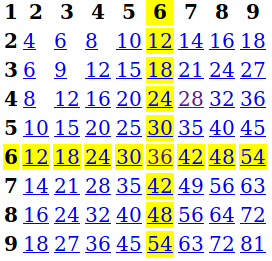
Create a PHP page that displays the multiplication tables in an HTML table (<table>...).
Make the first row and the first column (the "1 2 3 4...") appear in bold.
Make the multiplication results clickable, by loading the same page with
GET parameters so that the row and the column of the clicked number are
highlighted in yellow, which should look like this: