PHP Lab 2: The basics (2)
GET and POST parameters
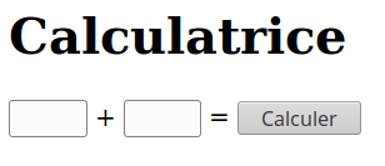
Create a form that displays the sum of two numbers, using GET and then POST.
 You can get the request method used (
GET or POST) from
the $_SERVER array, for example to check whether a POST form has been submitted.
Try var_dump($_SERVER) to explore the fields of this array.
Form and validation
Read and test the following code:
<?php

function process($first_name)
{
    echo 'Your name is ' . htmlspecialchars($first_name);
    echo '<hr/>';
}

?>
<!DOCTYPE html>
<html>
    <head>
        <meta charset="utf8" />
        <title>Form</title>
    </head>
    <body>
        <h1>Form</h1>

<?php
if ($_SERVER['REQUEST_METHOD'] == 'POST')
{

    if (isset($_POST['first_name']))
    {
        // The form is valid and properly filled in, call the processing
        // on the data
        process($_POST['first_name']);
    }
}
?>

<form method="post">
    Your first name:
    <input type="text" name="first_name" /><br />
    <hr />
    <input type="submit" value="Send" />
</form>
</body>
</html>
1. Understanding
A) How is the fact that the form was posted detected?
B) What does this test correspond to with respect to the HTTP protocol?
C) Why is the htmlspecialchars() function used here?
2. Adding a field
Add a last_name field to the form. When the form is submitted, if both fields are filled in,
the page should display: "Your name is [First name] [Last name]".
3. Some validation
Now add an email field. Above all, do not forget how the HTTP protocol works: even when
using the HTML5 email field type, the client can still send arbitrary data through a
POST request. This is why you absolutely must check server-side that the address provided is
well-formed; you can use the PHP function filter_var().
4. Drop-down menu
Add a "Gender" field as a drop-down menu (Male, Female). The gender will be displayed in the message after processing.
5. Checkboxes
Add checkboxes allowing the user to select the programming languages they know. For example:
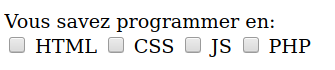
The languages will be displayed in the message after processing.
If you use languages[] in the name attribute of the checkboxes, you will get an array, which is much
more convenient than creating a checkbox with a different name for each language!
6. Pre-filling
If the user wants to change their choices (for example if they made a mistake, or if the server raises a validation error because their e-mail is not valid, etc.), notice that the form becomes empty again after being submitted.
Make it so that it is filled in again with the user's choices.
Calendar
Create a page that displays the calendar of the month by building an HTML table with PHP code.
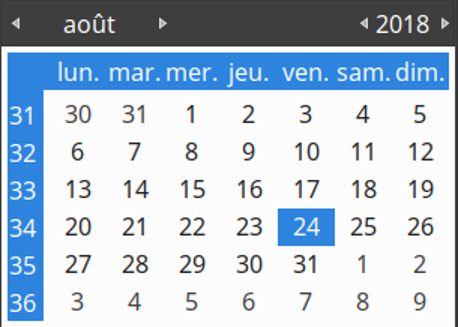
Make it possible to navigate between months and years.