History
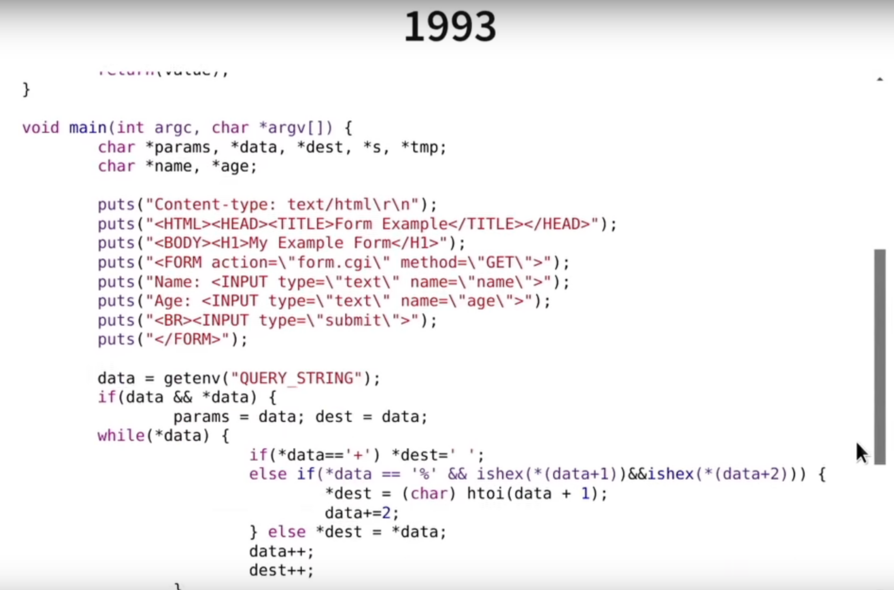
The web in 1993
CGI makes it possible to run applications that generate the content of a web response dynamically, for example in C in 1993:
PHP in 1994
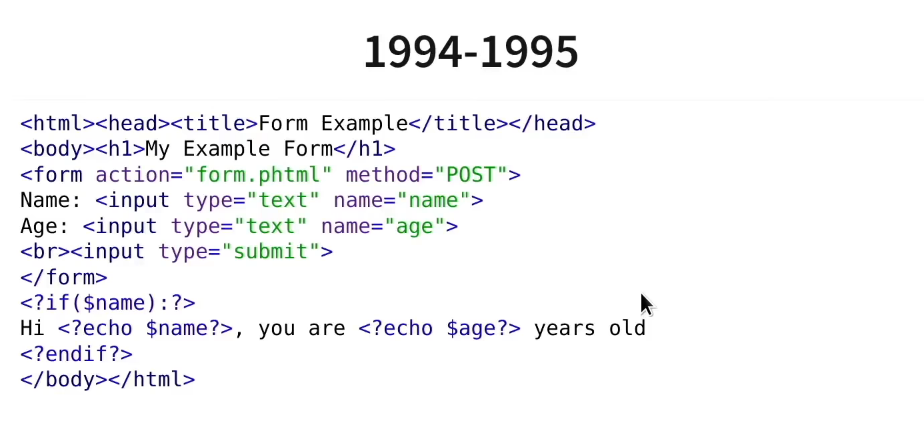
PHP (originally Personal Home Page) was invented to make building pages easier, by allowing variables to be inserted inside the text. It was originally a template language:
Introduction
Today, PHP is an interpreted language mostly used server-side in web applications.
It can be run using the php command line tool, for example:
<?php
// date.php
echo "It is ".date('H:i:s')."!\n";
And run this program:
$ php date.php
It is 17:25:12!
Template language
A peculiarity of the language is that it only interprets the content of PHP
tags, which start with <?php and end with ?>.
Everything else is sent to the standard output or to the browser
For example:
Hello worldWill display "Hello world", just like:
<?php
echo "Hello world";
Or even:
Hello <?php echo "World"; ?>This technique makes it convenient to generate text formats such as HTML:
<h1>Welcome <?= $name ?></h1>

You have <?= count($messages) ?> new messages:

<ul class="messages-list">
<?php foreach ($messages as $message) { ?>
    <li><?= $message['title'] ?></li>
<?php } ?>
</ul>
Here, the <?= $name ?> notation is a shorthand equivalent to <?php echo $name ?>
Language principles
The basics
<?php
$a = 123;
$b = "456";
echo "a+b=".($a+$b)."\n";
$a = true;- Variables are prefixed with
$ - The
+operator is addition, and.is concatenation, so there is no ambiguity - Typing is weak:
$acan hold values of different types during execution
var_dump()
A handy PHP function: var_dump(), which displays the content of any variable:
<?php
$a = 123;
var_dump($a);
// int(123)
$a = [1, 2];
var_dump($a);
// array(2) {
//     [0]=>
//     int(1)
//     [1]=>
//     int(2)
// }
Arrays
The PHP array, written [] or array(), is the basic data structure
of the language. It can be associative or not. Here is an example of
two arrays: $fruits, which contains elements, and $colors, which is
an associative array mapping the name of a fruit to its color:
<?php
// Array of elements
$fruits = ['apple', 'apricot', 'strawberry'];
// $fruits[0] is "apple" etc.

// Associative array
$colors = [
    'apple' => 'green',
    'apricot' => 'orange',
    'strawberry' => 'red'
];
// $colors['apple'] is 'green' etc.

// Iteration
foreach ($fruits as $fruit) {
    echo "The fruit ".$fruit." has the color: ";
    echo $colors[$fruit]."\n";
}
Arrays with implicit keys
Here is an overview of some common operations on arrays with implicit keys:
<?php
// Creating an empty array
$numbers = [];

// Creating a non-empty array
$numbers = [1, 2, 3];

// Appending the element 4
$numbers[] = 4;

// Displaying the size of the array
echo "There are ".count($numbers)." elements:\n";

// Iterating and displaying the elements
foreach ($numbers as $number) {
    echo "- $number\n";
}

// Removing from the head or the tail
array_pop($numbers); // Removes the last element
array_shift($numbers); // Removes the first element
Associative arrays
Here is an overview of common operations on an associative array:
<?php
// Creating an empty array
$nameToAge = [];

// Creating an array that already contains elements
$nameToAge = ['Ryan' => 30, 'Nina' => 12];

// Associating an element
$nameToAge['Gilbert'] = 56;

// Removing an element
unset($nameToAge['Ryan']);

// Checking for existence
if (isset($nameToAge['Ryan']))
    echo "Ryan is here!\n";

// Iterating
foreach ($nameToAge as $name => $age)
    echo "$name is $age years old!\n";
HTTP gateway
When used as a server, PHP gives access to a set of information about the current request.
Built-in server
You can use PHP's built-in server, which lets you start a server directly from the command line:
php -S 127.0.0.1:8080This will start a web server that interprets PHP pages. If you load
http://127.0.0.1:8080/date.php, you will see the message appear in your
browser.
GET parameters
GET parameters are passed in the request URL, for example:
http://127.0.0.1:8080/index.php?first_name=Jack&last_name=Smith
Here, the variables first_name=Jack and last_name=Smith are passed as GET parameters to the index.php page.
They will be available in the $_GET array:
<?php
// index.php
if (isset($_GET['first_name']) && isset($_GET['last_name'])) {
    echo "Hello ".$_GET['first_name']." ".$_GET['last_name']."!";
}
POST parameters
POST parameters are passed in the request body; they can for example come from a form:
<form method="post" action="hello.php">
    First name:
    <input type="text" name="first_name"/><br />
    Last name:
    <input type="text" name="last_name"/><br/>
    <hr />
    <input type="submit" value="Send" />
</form>
Once the form is submitted, these parameters will be available in the
PHP $_POST array:
<?php
// hello.php
if ($_SERVER['REQUEST_METHOD'] == 'POST') {
    echo "Hello ".$_POST['first_name']." ".$_POST['last_name']."!";
}Database
PHP's PDO interface is today a uniform way to access many different databases.
You connect by instantiating an object of type PDO:
<?php
$pdo = new PDO($dsn, $user, $password)
Where:
$dsn, for data source name, is the database connection string$useris the user's login$passwordis the user's password
For example:
<?php
$dsn = "mysql:dbname=shows;host=info-titania";
$user = 'user';
$password = 'password';
$pdo = new PDO($dsn, $user, $password);
Will connect to the department's database.
mysqlis the name of the driver, since the database is of type MySQL/MariaDB,info-titaniais the hostname of the server on the network,showsis the database on the server.
Simple query
The PDO::query() method lets you run a simple query on the database:
<?php
$sql = "SELECT title FROM series WHERE year_start < 2005";
$query = $pdo->query($sql);
foreach ($query as $row) {
    echo 'Name: ' . $row['title']. "\n";
}
The object returned by PDO::query() is iterable, and provides associative arrays mapping
column names to values.
Iterating over a query vs fetch()
Iterating over the query ($query) is actually equivalent to calling
$query->fetch() repeatedly until it returns FALSE:
<?php
foreach ($query as $row) {
}
// Is equivalent to
while ($row = $query->fetch()) {
}
Parameterized query
The PDO::prepare() method lets you create a prepared statement, that is, a query containing a parameter.
For example:
$sql = "SELECT * FROM series WHERE title = :title";
$query = $pdo->prepare($sql);
if ($query->execute(['title' => 'Dexter'])) {
    foreach ($query as $row) {
        echo 'Name: ' . $row['title']. ", start year: " . $row['year_start'] . "\n";
    }
}
Here, :title is a prepared parameter of the query, which is provided at execution time
with PDO::execute().
Another option is to leave the parameters unnamed, and use the
? symbol:
$sql = "SELECT * FROM series WHERE title = ?";
$query = $pdo->prepare($sql);
$success = $query->execute(['Dexter']);
// ...
In this case, the order of the elements in the array passed to PDO::execute() is what matters
Number of results
You can use the rowCount() method on a PDOStatement object
(obtained with query() or prepare()) to know how many rows were returned:
<?php

$query = $pdo->query('SELECT title FROM series');
echo "There are ".$query->rowCount()." results";Warning: If your only goal is to count the results, without fetching them, use:
<?php

$query = $pdo->query('SELECT COUNT(*) as nb FROM series');
$result = $query->fetch();
echo "There are ".$result['nb']." results";
rowCount() should only be used on queries whose results you want to fetch.
Cookies and sessions
Cookies
Cookies are data stored by the browser at the request of the web server.
In PHP, you can create them using setcookie:
<?php
// Creates a "name" cookie whose value is "bob"
setcookie('name', 'bob');
You can then access the defined cookies through the $_COOKIE array:
<?php
// Was the name cookie provided?
if (isset($_COOKIE['name'])) {
    echo "Hello ".$_COOKIE['name'];
}
Sessions
How can you build an authentication system based on cookies?
Keep in mind that cookies are stored in plain text, so they can be modified arbitrarily by the user.
To do this, we randomly generate a "token" that uniquely identifies a user,
for example 0E28B4E12, and store it in a cookie, for example
ID.
When the client sends ID=0E28B4E12, the server will recognize it
and can retrieve a "bundle" of variables associated with it.
If the client picks a random ID, it statistically has no chance of hitting an existing ID.
This mechanism is called a session, and is implemented in PHP:
<?php
// Initializes the session system
session_start();

if (isset($_SESSION['user'])) {
    echo "Welcome ".$_SESSION['user']."!";
} else {
    header('location: login.php');
}
Here, you can read, write and check for values in
the $_SESSION array, which is stored server-side.