This is why frameworks exist, and using one becomes essential
for large projects. For example:
But first, let's go through the features these software tools provide!
The MVC pattern
A bad example
Consider the following PHP page:
<ul>
<?php if ($_GET['page'] == 'show') {
    $sql = 'SELECT title FROM series ORDER BY title ASC';
    $query = $pdo->query($sql);

    foreach ($query as $row) { ?>
        <li><?= $row['title']; ?></li>
<? }
}
?>
</ul>
Many things are mixed together here, which makes the code compact,
hard to read and hardly reusable.
We can actually list the problems:
The view logic and the SQL query are "hard-coded", so they cannot be reused
by another component
Imagine for instance that we want to change the data source (we would like
to reuse the view)
Or write a JSONAPI in addition to the website (we would like to reuse
the query)
If the query fails, the page will stop loading right in the middle of rendering
Switching back and forth with <?php makes the code hard to read when
there is logic around it
From a maintenance point of view, it is impossible to find, for example, all the code
dealing with the database in such an application
This code cannot be unit tested, because everything is functionally merged.
Principle
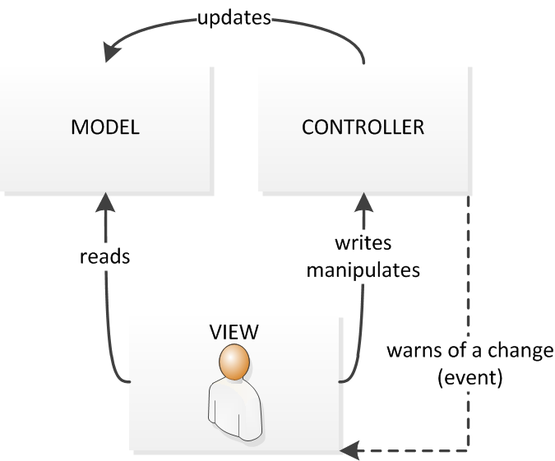
The MVC pattern, for Model, View, Controller, proposes a separation of concerns:
The Model deals with the application's data,
The View deals with the user interface,
The Controllers handle the user's actions.
Example
For instance, to rewrite this code following this separation, we could first
write in a Model class:
// Model.php, Model class
protected function getSeries(): array
{
    $sql = 'SELECT title FROM series ORDER BY title ASC';
    $query = $this->pdo->query($sql);

    return $query->fetchAll();
}
Then, retrieve these values in the controller, if the GET
parameter has the right value:
if ($_GET['page'] == 'show') {
    $series = $model->getSeries();
}
However, a framework is not just an organizational philosophy, it is also
a set of software tools that assist you in each of these tasks. We
will now present some of these components.
Router
Principle
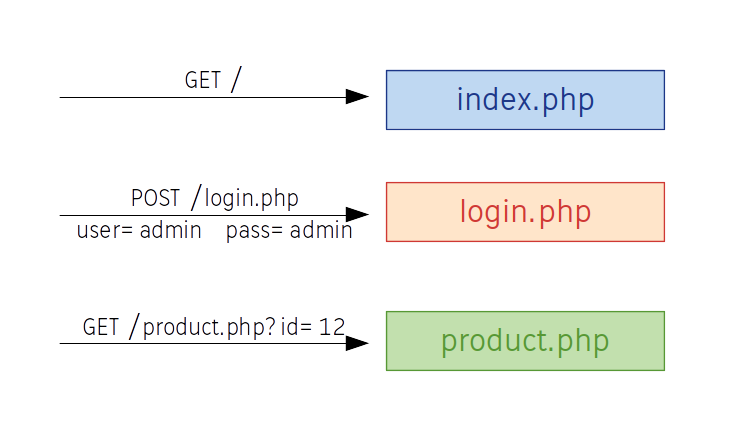
So far, this is how we have been doing things:
Here, the routing is implicitly done by the web server, since the PHP scripts are different resources.
The problems with this approach:
In each .php file, you have to include the various parts of the code again (boilerplate), which makes the application hard to maintain
Page names appear in the URL bar, which is not necessarily good for search engine optimization and gives no flexibility in naming addresses
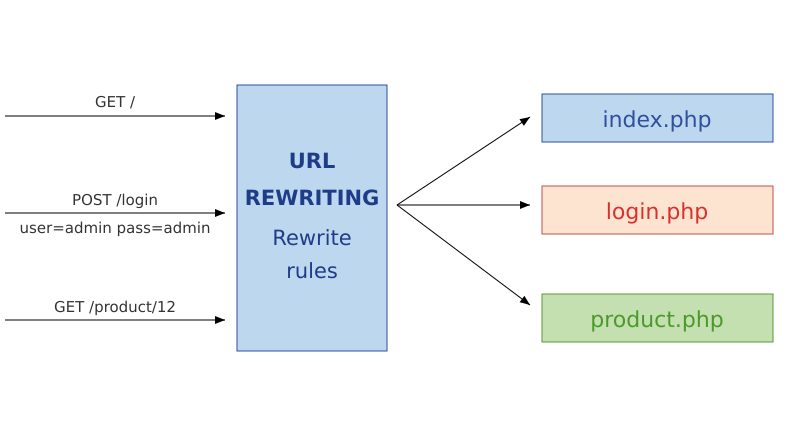
One way to get nice URLs is to use the web server's URL rewriting mechanism:
This solution gives us arbitrary URLs, but requires maintaining a URL rewriting file, which is moreover specific to the web server in use.
Furthermore, it does not solve the problem of having multiple PHP files.
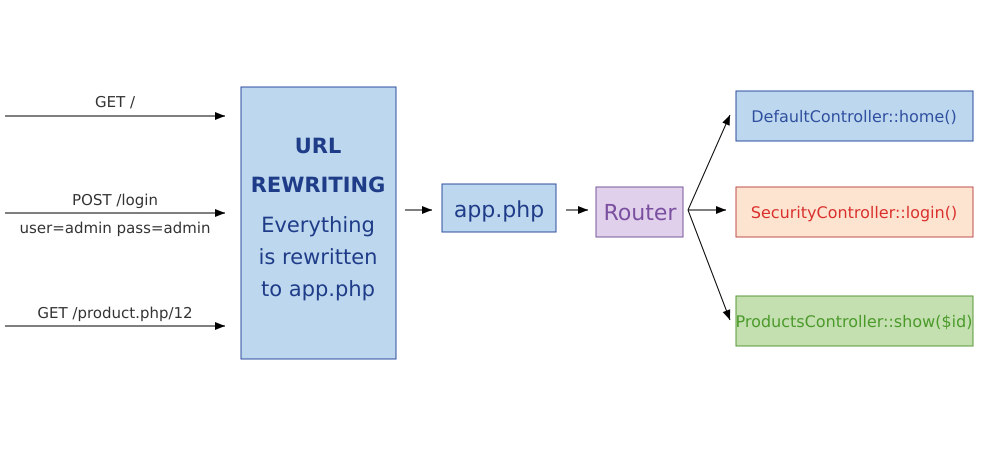
When using a framework, URL rewriting is used, but towards a single front controller:
This way, routing is done in PHP within the application.
Routing is the problem of associating addresses (URLs) with the controller (the piece of
PHP code) that will be invoked.
The router is therefore a set of matching rules.
For example:
/home →
DefaultController::home()
/login →
SecurityController::login()
/product/{id} →
ProductController::show($id)
Example
<?php

class DefaultController
{
    /**
    * @Route("/hello/{name}", name="hello")
    */
    public function hello($name)
    {
        return new Response('Hello '.$name);
    }
}
Here:
The @Route("/hello/{name}") annotation is a way to map
the /hello/{name} route to the hello($name) function
The function simply returns a response containing the name
The route is also given a name (hello)
Generating routes
Routes map an address to a controller, but they can also be used to produce URLs.
For example, from the route name, you can ask the router to generate the matching address:
As you can see, Twig lets you write documents directly in HTML, except for some
tags that add structure, much like PHP.
In this example:
{% block content %} is a block that can be overridden in child templates
{{ block('title') }} displays again the content of the title block used earlier
{{ name }} displays a variable
Inheritance
The previous template can be extended like this:
{% extends 'index.html.twig' %}

{% block title %}
    {{ parent() }} - My page
{% endblock %}

{% block content %}
    Welcome to this page!
{% endblock %}
The extends keyword states that this page inherits from index.html.twig. Just like
class inheritance, your template will then be based on this parent template and can redefine its
behavior.
Blocks can then be overridden, that is modified by redefining them. You can also use
parent() to call the parent template and use its content, as in the case of the title,
which here becomes "My title - My page"
Loops, conditions
You can also use conditions and loops with Twig:
{% if not users|length %}
<i>No users</i>
{% else %}
<ul>
    {% for user in users %}
        <li>{{ user.name }}</li>
    {% endfor %}
</ul>
{% endif %}
Less overlap between the roles of the controller and the view
Security, with variables escaped by default
Extra features compared to "raw" PHP, such as inheritance
Property resolution (user.name can be $user['name'] or $user->getName())
Object-relational mapping
Overview
An ORM, for Object Relational Mapping, performs a mapping,
that is an association between the relational world (tables, rows, fields...) and the object world
(classes, instances, attributes...).
This mapping is usually done with configuration files or annotations.
Correspondence
Relational
Object
Table
Class (or entity)
Row
Instance
Column
Attribute
Foreign key
Reference
This correspondence becomes clear when comparing an entity-relationship diagram with a UML diagram.
Database First vs Code First
There are two paradigms when it comes to ORMs:
Database First, where the database is created before the application
using it. This approach is useful when the database already exists
for historical reasons, or when it is also used by
other applications, for example.
Code First, where the code is written before the database, and the
latter can even be generated by the ORM itself.
Example: Doctrine
One example is Doctrine, the ORM that comes with the Symfony framework.
In Database First, it can for instance generate, from
the shows database, a set of classes matching the tables of the
database.
Querying with Doctrine
You can then run queries using Doctrine:
public function indexAction(SeriesRepository $repository)
{
    $series = $repository->findBy(['year_start' => '2011']);

    return $this->render('series/index.html.twig', [
        'series' => $series
    ]);
}
And then display them in the view:
<ul>
    {% for show in series %}
        <li>{{ show.title }}</li>
    {% endfor %}
</ul>
Note that series here is a collection of instances
of the Series class.
Most simple operations can be done without writing any SQL query!
Querying
In general, an ORM provides an API for querying through methods, as well as
a dedicated language.
For example, Doctrine provides the DQL language to query the database:
<?php
// Here we don't query the tables but the ORM "classes"
// The language is independent of the actual DBMS
$query = $entityManager->createQuery('SELECT s
    FROM App:Series s
    WHERE s.year_start = "2011"');
$series = $query->getResult();
Advantages
Object persistence
Querying, sometimes through an additional abstraction layer
Transactions are preserved
Creating and updating the database structure from the entity definitions
The ability to abstract away the underlying database management system