Symfony Lab 2: code first
In this lab, we will create a code-first project, which means that the database will be created and will evolve automatically based on the changes you make.
Configuration
Edit the connection string in the .env file.
If you are using the department's database, it will look like this:
DATABASE_URL=mysql://user:password@info-titania:3306/showsCreating the "User" entity
First, we will create a user entity, using the make:user command:
symfony console make:userKeep the default answers. Look at the generated code in Entity/User.php.
You can now create the schema in the database, using the
doctrine:schema:create command:
symfony console doctrine:schema:createLook at the result in the database.
Creating form-based authentication
We will now create form-based authentication:
symfony console make:authAnswer "1" to the first question (Login form authenticator), and let the generator run.
We will need to create a first user. To do so, we can use:
symfony console make:registrationDo not send e-mails to confirm registration.
Go to the /register page, then to /login and /logout to test everything!
You will have to edit the AppAuthenticator.php file to add a redirection to
a page (the home page, for example) after logging in.
Adding a field
We will now let users provide their name when registering. The "name" field does not exist in the database. But don't touch it!
We will use Symfony's Swiss army knife: make:entity, to modify the user
entity and add a name to it.
symfony console make:entityGive it the string type, with a length of 255, not nullable. The entity is now
up to date: look at src/Entity/User.php and its changes.
However, the database has not changed. To update it, you can use the
doctrine:schema:update command. To do so, first look at the output of:
symfony console doctrine:schema:update --dump-sqlThis command produces the SQL code that updates the database (in this case ALTER ...).
You can force the execution of this code:
symfony console doctrine:schema:update --forceAnd check that the field now appears in the database.
So that the user provides their name, edit RegistrationFormType.php, and possibly
register.html.twig.
User's country
Country entity
We will now ask for the user's country when registering. However, it will not be a text field, but an association in the database.
First, let's create the Country entity using make:entity. This entity will
simply have a name.
Then, you will need to add a country field referring to a country in User.
To do so, use make:entity again, add the country field to the User
entity, and specify that its type is ManyToOne, referring to the Country entity.
Update the database (using the doctrine:schema:update --force command).
Look at the result in the database.
Generating a CRUD
Then, let's create an automatic controller for Country, using make:crud, and go
to /country/ to create a few countries.
You can look at the code generated by make:crud in src/Controller/CountryController.php
and templates/country/*.
As in the previous part, add the field to the user registration form. Notice the following error:

when trying to load the /register page. The reason is that Symfony tries to render the country
selection field as a select, and does not know how to display a Country.
To fix this, override the __toString() method in Country.
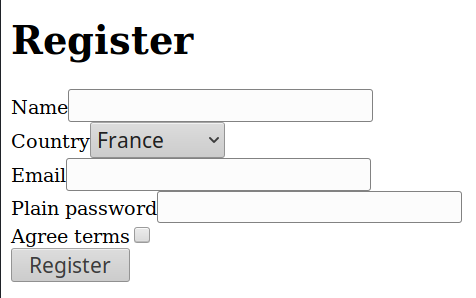
Register with this form and look at what happens in the database.
Using entities
On a page, the home page for example, display the logged-in user's name and country.
Hint: don't overthink it, it's very easy!
Adding messages
We will let users write messages, which will appear in reverse chronological order once logged in, while keeping track of who sent them.
Create a Message entity, which has (none of the fields is optional):
body, the message body, of typetextcreation_date, the creation date, of typedatetimeuser, the user who posted the message, of typeManyToOnetoUser.
Update the database and generate a CRUD for messages.
Modify the generated code so that:
- Messages appear in reverse chronological order (according to
creation_date)
- Instead of choosing the user posting the message from a drop-down menu, the current user is used
- The current date is also used when the message is created.
Many-to-many relationship
Finally, we will add "categories" to messages. A message can be associated with several categories (high-tech, sport, hobbies, general...).
First, create the Category entity using make:entity, which will only have a name.
Create a ManyToMany association between Message and Category.
Modify the message creation form so that categories can be chosen. Here are a few remarks/hints:
- In the form, you can leave the field type as
nullto let Symfony guess it - Checkboxes are more user-friendly than a drop-down menu allowing multiple
selections. To get them, you can use the
expandedoption on the field. - You will also need a
__toString()function inCategory
Display the categories in which messages were posted when viewing them.